Set up the command
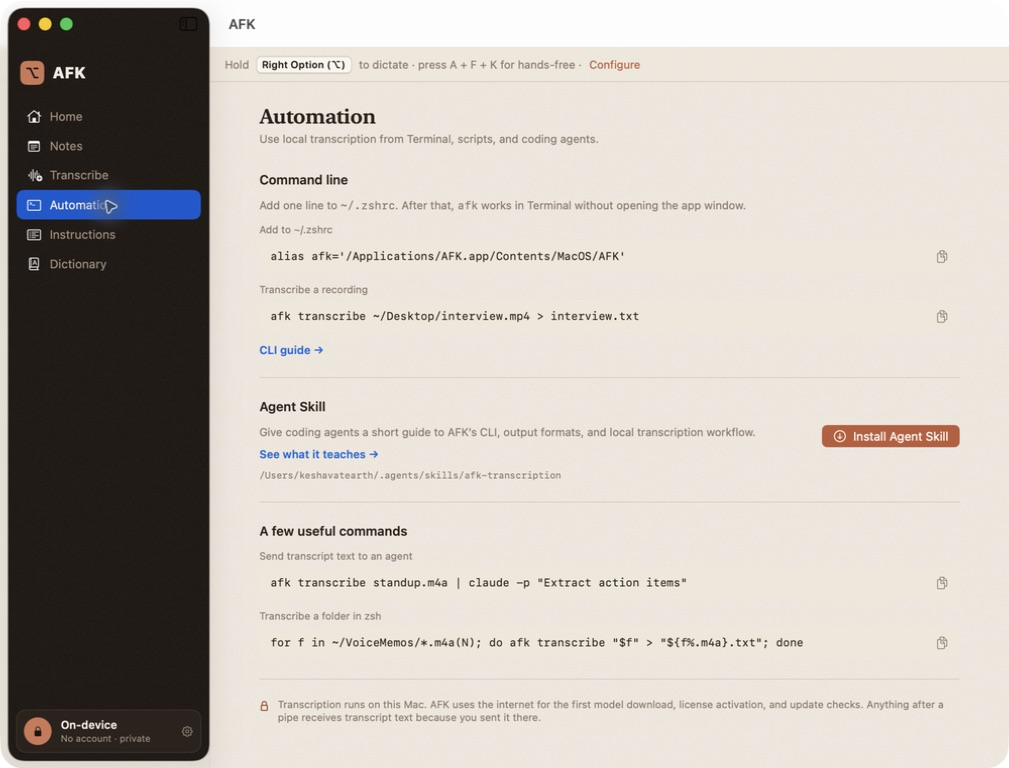
AFK is distributed as an app, so the executable lives inside the bundle. The app's Automation screen shows the current path and a zsh alias. For a standard Applications install:
$ echo "alias afk='/Applications/AFK.app/Contents/MacOS/AFK'" >> ~/.zshrc
$ source ~/.zshrc
Or invoke the binary by its full path. afk --help, afk --version, and CLI errors stay headless; they do not open the SwiftUI window.
Use the Automation screen
AFK's Automation section shows the executable path for the copy you launched, a one-line zsh alias, practical recipes, and the local/network boundary. It also installs the bundled Agent Skill with one explicit click. The app never edits an existing different skill; review that copy and use the CLI's --force flag only if you intend to replace it.
Usage
$ afk transcribe <audio-or-video-file> [--v2] [--lang <code>] [--json | --srt]
$ afk install-agent-skill [--force]
Input boundary
Pass one quoted local path after transcribe. The CLI accepts AFK's supported audio inputs and an .mp4 file with an audio track. AFK extracts that track with Apple's media frameworks into a private temporary directory and removes it after success or failure. An MP4 without audio returns a clear error; other video containers are not supported.
Flags
| Flag | Behavior |
|---|---|
--v2 | Use the English-only Parakeet v2 model instead of the default multilingual v3 model. |
--lang <code> | Pass an ISO 639-1 language hint to the v3 decoder, for example --lang en. If omitted, the CLI leaves the language unset for auto-detection. The flag is ignored by v2. |
--json | Print pretty-printed JSON containing text, duration, and words with timing and confidence fields. |
--srt | Print SubRip subtitle output built from timestamped segments. |
Use one export flag at a time. Combining --json and --srt, supplying an unknown flag, or passing more than one input path is an error.
Stdout, stderr, and exit behavior
Successful transcript output is printed on stdout. Model-loading progress, “transcribing” status, completion timing, and errors are written to stderr. That keeps a pipe or redirect focused on the transcript.
$ afk transcribe standup.m4a > standup.txt
$ afk transcribe interview.mp4 --srt > interview.srt
$ afk transcribe memo.m4a --json | jq '.text'
A missing input or invalid option prints usage to stderr and exits with status 2. A model, extraction, or audio failure prints an error to stderr and exits with status 1. A successful command exits with status 0.
Useful recipes
$ for f in ~/VoiceMemos/*.m4a(N); do
>   afk transcribe "$f" > "${f%.m4a}.txt"
> done

$ afk transcribe interview.wav | pbcopy
These are shell examples, not a separate service (the zsh (N) qualifier makes an empty glob produce no loop iterations). The transcript only goes to the program you pipe it to or the file you redirect it into.
Install the bundled Agent Skill
The signed app includes a short afk-transcription Agent Skill. Install it from the Automation screen or explicitly from Terminal:
$ afk install-agent-skill
The command copies the skill to ~/.agents/skills/afk-transcription. An identical copy is left alone. A different existing copy is not overwritten unless you deliberately pass --force. The skill tells agents how to quote paths, keep progress on stderr, handle MP4 and long recordings, and respect the boundary between local transcription and sending a transcript elsewhere.
Download the bundled Agent Skill (SKILL.md) →
Offline boundaries
On its first invocation, the CLI prepares the same Parakeet model and may need the network to download it. After the model is ready, recognition and file reading run locally. The CLI itself does not send audio to an API and does not need a Polar access token. Piping its stdout into a networked tool is a separate disclosure; do that only when you intend to send the transcript there.
For the app's license activation and updater behavior, see the privacy page. For a failed model setup, see troubleshooting.