Queue the work
Choose multiple audio files or drag them into the app. Jobs run one at a time and can be removed while queued, running, or complete.
Drop a supported audio file into AFK, let the on-device speech engine work through it in chunks, and save the result as text, subtitles, or timestamped JSON.
Interviews, lectures, voice memos, and other long audio can be queued from the Transcribe tab. AFK streams source audio in 120-second chunks, transcribes each chunk, and shifts word timings back onto the full recording timeline.
Choose multiple audio files or drag them into the app. Jobs run one at a time and can be removed while queued, running, or complete.
When the model returns word timings, AFK can show timestamped segments and use them for SRT or JSON export.
Save TXT, SRT, or JSON. Unsaved non-empty results stay in the local cache for one hour; saving creates a lightweight History reference.
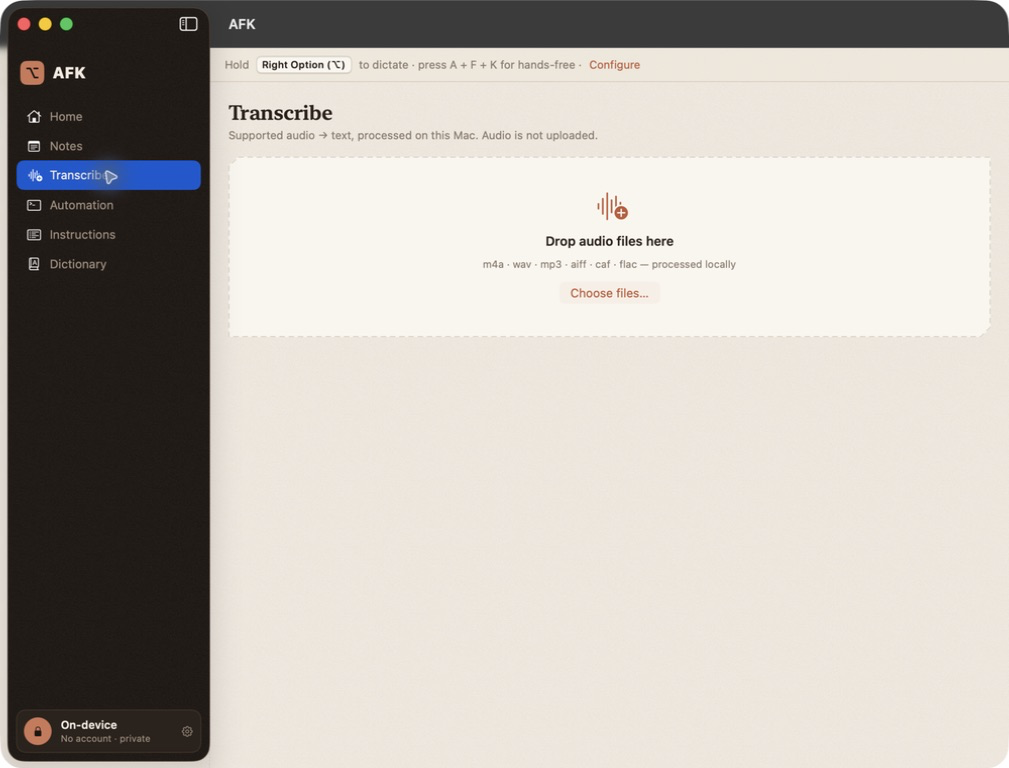
The drop target explicitly recognizes these extensions, and the file picker accepts audio types recognized by macOS.
.m4aCommon voice-memo and compressed audio files..wavUncompressed PCM audio..mp3Compressed audio..aiff / .aifAIFF audio files..cafCore Audio Format files..flacLossless audio files.The app's file picker is for audio. The separate CLI also accepts an .mp4 file when it contains an audio track.
The default Parakeet v3 model is multilingual across 25 European languages. AFK can also use an English-only Parakeet v2 model from the app's settings.
The first run needs the network to download and optimize the model. After that, file reading and speech recognition run locally. License activation and Sparkle update checks are separate network operations.
Install AFK, set up the model once, and make the next long audio file a local job.